Switching and VLAN Trunking
What is a VLAN?
- VLAN = Virtual Local Area Network
- A logical way to divide one physical switch (or group of switches) into multiple separate broadcast domains — as if you had completely separate physical switches.
Key Characteristics
- Each VLAN is identified by a VLAN ID (1–4094)
- VLAN 1 = default (native on most switches)
- Reserved: 1002–1005 (legacy FDDI, Token Ring, etc.)
- Devices in different VLANs cannot communicate at Layer 2 (even on same switch)
- Broadcasts, multicasts, unknown unicasts stay within their VLAN
- Requires Layer 3 device (router, Layer 3 switch, firewall) for inter-VLAN communication
Benefit
- Reduces broadcast domain size → less unnecessary traffic
- Improves security → departments / guest / IoT cannot snoop each other at L2
- Better traffic management (e.g. separate VoIP traffic)
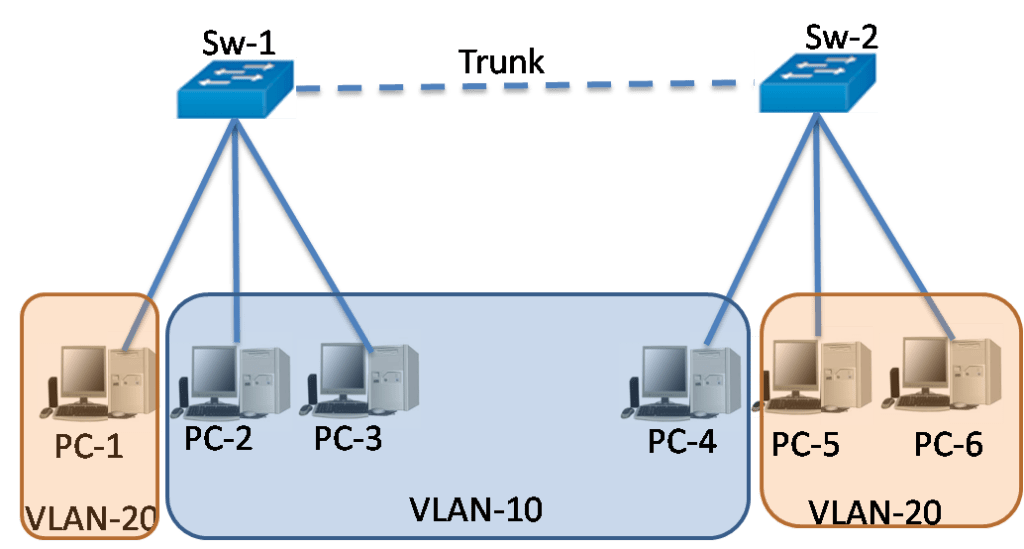
- Logical grouping regardless of physical location
Port Types Related to VLANs
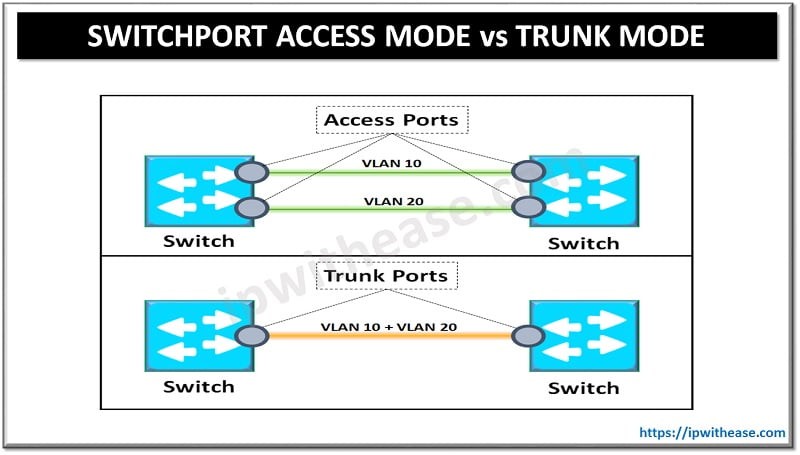
- Access port → belongs to exactly one VLAN (untagged traffic)
- Trunk port → carries multiple VLANs (tagged traffic + one native VLAN untagged)
Trunking
- Trunking = method to carry traffic from multiple VLANs over a single physical link between switches (or switch ↔ router).
Standard Protocol
- IEEE 802.1Q (dot1q)
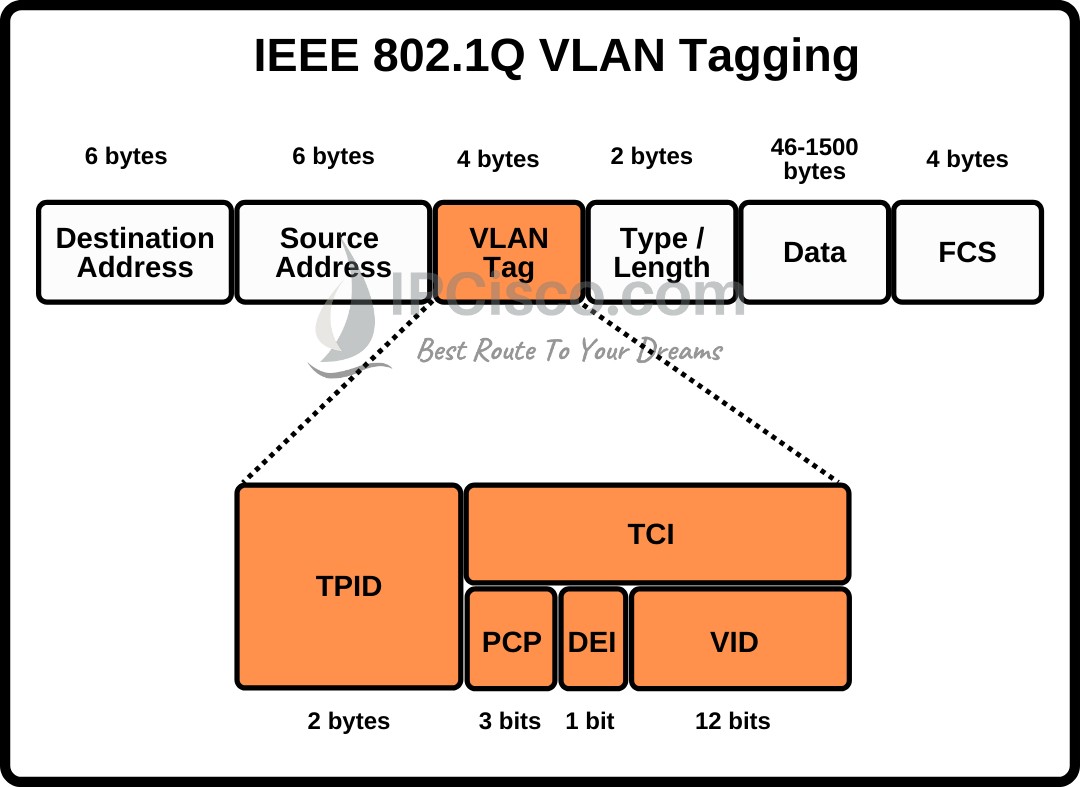
- Adds 4-byte VLAN tag to Ethernet frame
- Cisco proprietary ISL is obsolete (not on current exam)
802.1Q Frame Structure
Key fields in tag:
- TPID = 0x8100 (identifies 802.1Q)
- VID = VLAN ID (12 bits → 4094 possible VLANs)
- PCP = Priority Code Point (CoS – 3 bits)
- DEI = Drop Eligible Indicator (1 bit)
How Trunking Works
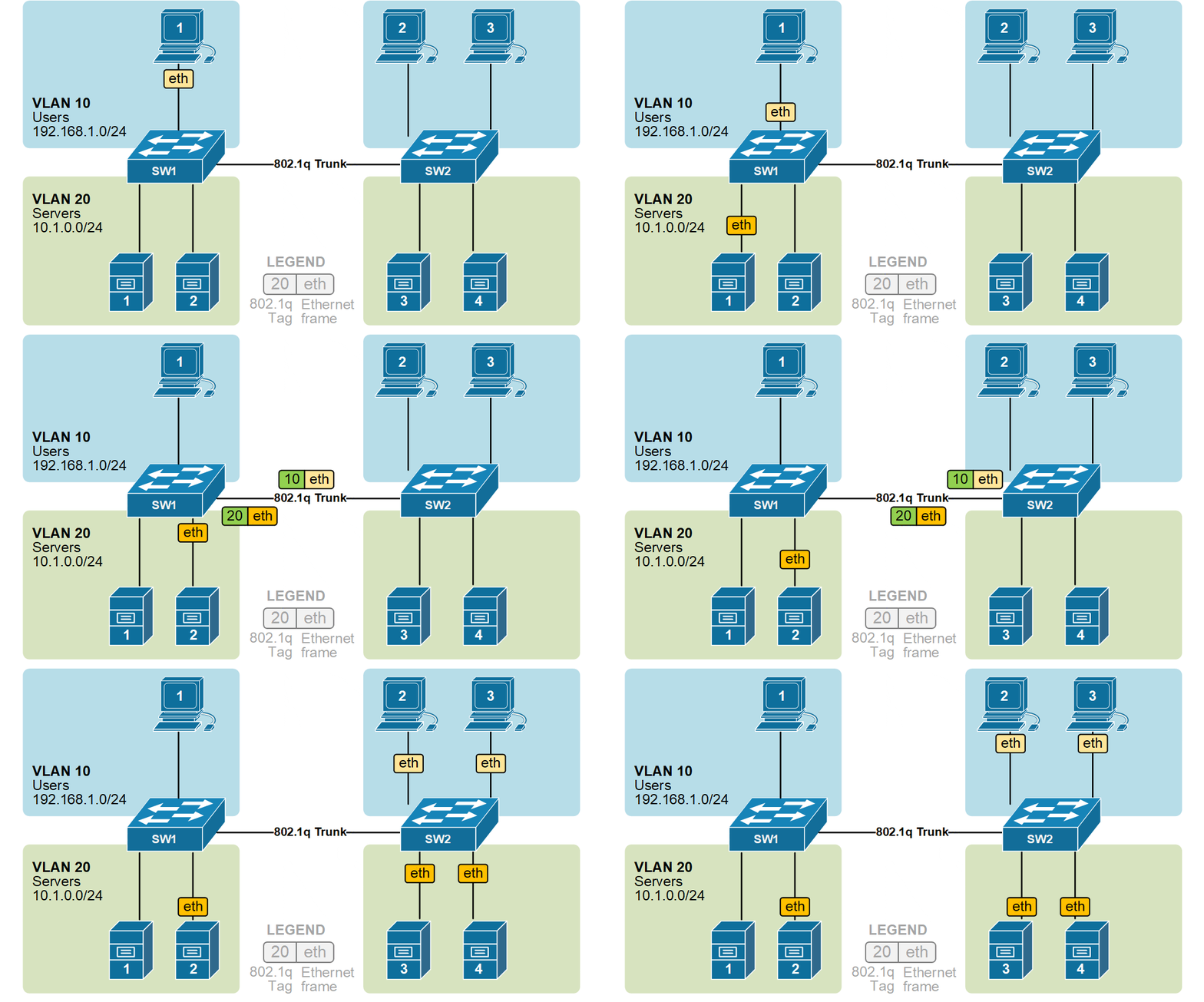
- Sending switch adds 802.1Q tag (with VLAN ID) before forwarding frame out trunk port
- Receiving switch reads tag → strips it → forwards to correct VLAN
Important Concepts
-
Native VLAN
- The one VLAN sent untagged on a trunk (default = VLAN 1)
- Must match on both ends of trunk → otherwise security risk (VLAN hopping, native VLAN mismatch)
- Best practice: change to unused VLAN and match both sides
-
Allowed VLAN list
- By default: all VLANs allowed on trunk
- Restrict with switchport trunk allowed vlan ... for security & bandwidth
-
Trunk negotiation (Cisco)
- DTP (Dynamic Trunking Protocol) — auto / desirable / nonegotiate
- Exam tip: best practice = explicit switchport mode trunk + switchport nonegotiate
Access vs Trunk – Quick Reference Table
| Feature | Access Port | Trunk Port (802.1Q) |
|---|---|---|
| VLANs carried | 1 only | Multiple |
| Tagging | Untagged | Tagged (except native VLAN) |
| Typical devices | PCs, printers, IP phones (data) | Switch ↔ switch, switch ↔ router |
| Frame format | Standard Ethernet | 802.1Q tagged Ethernet |
| Command (Cisco) | switchport mode access | switchport mode trunk |
| VLAN assignment | switchport access vlan 10 | switchport trunk native vlan 999 |

Common Exam Scenarios & Troubleshooting
- Native VLAN mismatch → trunk up but no traffic for native VLAN, possible CDP errors
- Trunk not forming → DTP mismatch, speed/duplex mismatch, VLAN not created
- Voice VLAN (bonus) → special access port that accepts tagged voice + untagged data
- Example: PC plugs into phone, phone plugs into switch
- Commands to know:
- show vlan brief
- show interfaces trunk
- show interfaces switchport